Getting Started with This Blog
Why I got into this?
When developing an application, we were implementing an API that had a number key type. Easy peasy lemon squeezy (🍋). But what we realized was that there was a really weird and frustrating bug. Apparently, the Javascript implementation of JSON.stringify only works till 2^53 [Stackoverflow link], but we had to support for ~20 digits. The fix was to change it to string. We looked at the above link, made the fix and called it a day. Sidenote, Twitter also faced this issue 😅
Classic case of Integer Overflow, right? But this is so weird, considering this is the 2020s era and not the 1970s where we are not bound by 16-bit (or even less) CPU architectures, with GBs (and not KBs) of RAM. That is when I dug into the rabbit hole of JSON. I found a lot of things that surprised me. From different JSON formats to different RFCs for JSON implementation itself to whatever the frontend (JS, looking at you) world brings onto the table to fix JSON issues.
JSON Implementations
This is a web of implementations. A very apt blog is JSON Parsing is a minefield.
| RFC Number | Date | Status |
|---|---|---|
| RFC 4627 | July 2006 | Obsoleted by RFC 7159, RFC 7158 |
| RFC 8259 | December 2017 | Internet Standard |
| RFC 7159 | March 2014 | Proposed Standard |
RFC 4627 can be looked at as a legacy RFC which has become obsoleted by #7159.
The only difference between RFC 8259 and RFC 7159 is that RFC 8259 has strict UTF-8 requirements while RFC 7159 can have UTF-16, UTF-32 in addition to UTF-8.
My reaction:

This image stays visible while you scroll
JSON Formats
Many formats augment JSON to create a kind of DSL.
The most popular format is JWT (JSON Web Token, and the rest of the JSON Cryptographic suite). This is the most popular so we can skip that for now, as other blogs would explain this in great depth and clarity. There are some that we use in our daily lives but we just know them or some format that is present for niche use cases.
This is the list I have come up with:
-
JSONSchema
-
GEOJSON
-
JSON-LD
-
Vega
-
NDJSON
-
HAR
-
JWT
I’ll go through the first two as I think these are more important to know as a software engineer.
JSON Schema
When the world migrated from XML to JSON, the web was fine with making JSON “Schema-less”. But as applications grew, we wanted to bring back schema so that there is some sanity with strong types/schema.
JSON Schema is for that purpose only. Bring back the schemas!
Building Blocks
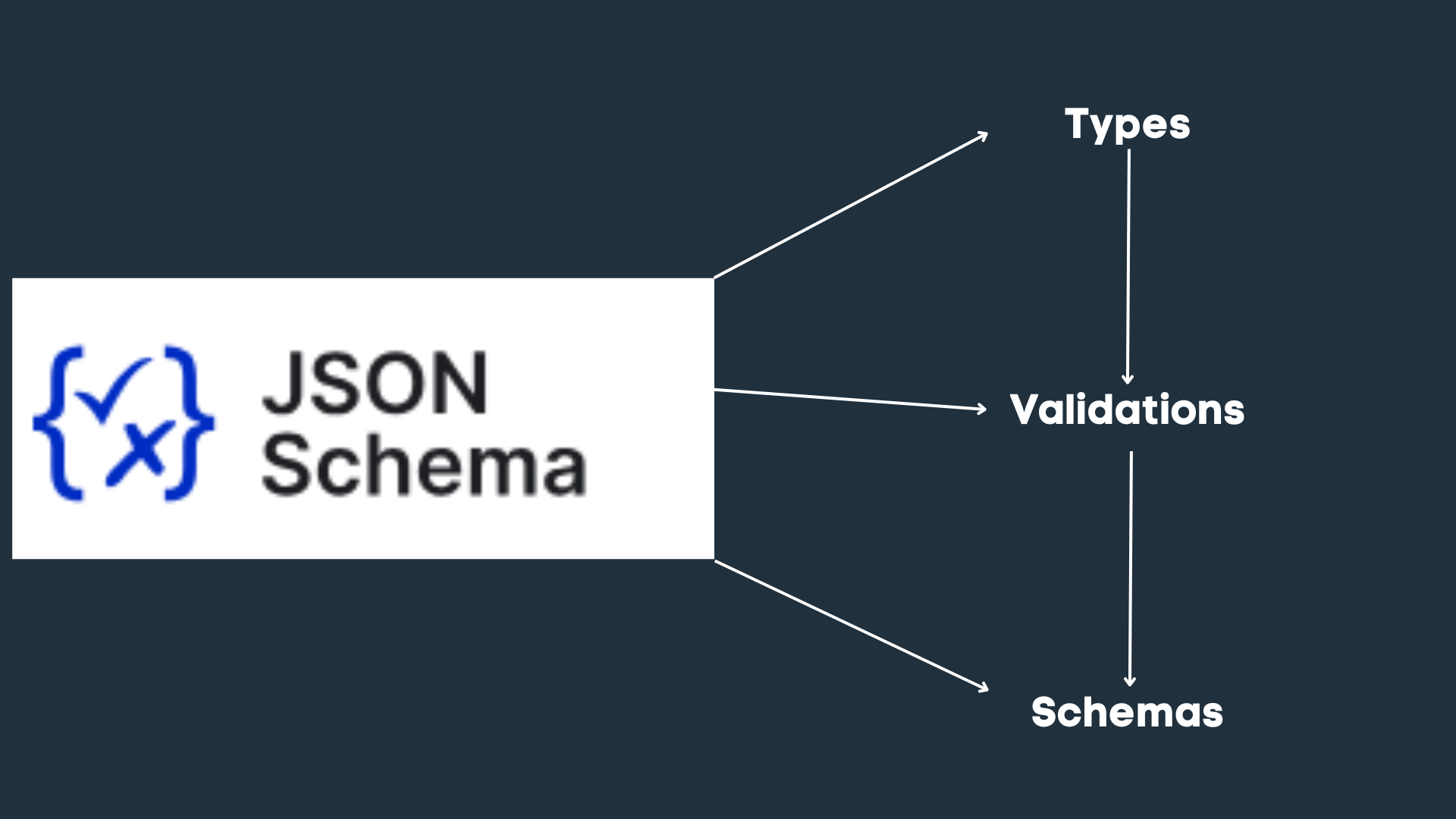
- Schemas
Allows to adhere to a specific schema. JSON Schema has various implementations such as Draft4, Draft5, Draft7
- Types
Bring back the types!
it can also encapsulate inside subschemas.
List of types supported:
-
string
-
number
-
integer
-
array
-
boolean
-
nul
3. Validations
-
Rules on how JSON input can validate against the given schema. This can be of various types such as TypeValidations, Conditional, Regex Patterns etc
List of validations provided by JSONSchema

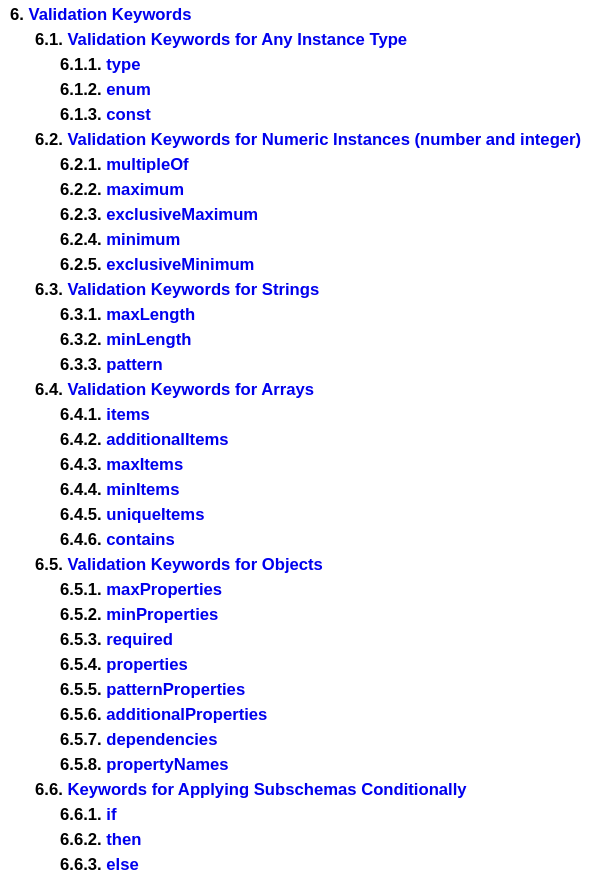
Example:
- JSON Schema Example
{
  // Can provide versions: draft-04, draft-05, draft-06, draft-07
  "$schema": "http://json-schema.org/draft-04/schema#",
  "title": "User Profile", // Optional string for presenting to user
  "type": "object",
  // Validations
  "properties": {
    "userId": {
      "type": "integer",
      "description": "The unique identifier for a user"
    },
    "firstName": {
      "type": "string",
      "description": "The user's first name"
    },
    "lastName": {
      "type": "string",
      "description": "The user's last name"
    },
    "email": {
      "type": "string",
      "format": "email",
      "description": "The user's email address"
    },
    "phone": {
      "type": "string",
      "pattern": "^\\+?[0-9\\-\\s]+$",
      "description": "The user's phone number"
    },
    "dateOfBirth": {
      "type": "string",
      "format": "date",
      "description": "The user's date of birth in YYYY-MM-DD format"
    }
  },
  "required": ["userId", "firstName", "lastName", "email"]
}- Valid JSON Input
{
  "userId": 12345,
  "firstName": "John",
  "lastName": "Doe",
  "email": "johndoe@example.com",
  "phone": "+123-456-7890",
  "dateOfBirth": "1990-01-01"
}
NOTE: Can try out different JSONSchema Draft versions here
$ref can also be used for the recursive schema. Hence, you can achieve compatibility by following the DRY(Don’t Repeat Yourself) principle
- Example Schema:
{
  "$schema": "http://json-schema.org/draft-07/schema#",
  "title": "Personnel Record",
  "type": "object",
  "properties": {
    "firstName": {
      "type": "string"
    },
    "lastName": {
      "type": "string"
    },
    "address": {
      "$ref": "#/definitions/address"
    }
  },
  "required": ["firstName", "lastName", "address"],
  "definitions": {
    "address": {
      "type": "object",
      "properties": {
        "street": {
          "type": "string"
        },
        "city": {
          "type": "string"
        },
        "state": {
          "type": "string"
        },
        "postalCode": {
          "type": "string"
        }
      },
      "required": ["street", "city", "state", "postalCode"]
    }
  }
}- Valid JSON Input
{
  "firstName": "John",
  "lastName": "Doe",
  "address": {
    "street": "123 Main St",
    "city": "Springfield",
    "state": "IL",
    "postalCode": "12345"
  }
}
Usage
-
Used for API validation. There are multiple parser libraries in different languages that can help
-
Golang: https://pkg.go.dev/github.com/santhosh-tekuri/jsonschema/v5
-
Java: https://github.com/eclipse-vertx/vertx-json-schema (For vertz applications)
-
Used in OpenAPI Swagger codegen specification to generate API validations for Swagger specifications
- OpenAPI v2.0 has 80% compatibility with JSONSchema Draft v4 while OpenAPI v3.0 has 90% compatibility with JSONSchema Draft v5 (Link)
-
JSON Validation for Mongo Collections (Link)
GeoJSON
Wikipedia Link: https://en.wikipedia.org/wiki/GeoJSON
GeoJSON data format is used in Geographical applications which could be geospatial or web mapping apps. It is based on JSON and contains geographical features such as:
-
Points
-
Line Strings
-
Polygons
Example JSON:
{
  "type": "FeatureCollection",
  "features": [
    {
      "type": "Feature",
      "geometry": {
        "type": "Point",
        "coordinates": [102.0, 0.5]
      },
      "properties": {
        "prop0": "value0"
      }
    },
    {
      "type": "Feature",
      "geometry": {
        "type": "LineString",
        "coordinates": [
          [102.0, 0.0],
          [103.0, 1.0],
          [104.0, 0.0],
          [105.0, 1.0]
        ]
      },
      "properties": {
        "prop0": "value0",
        "prop1": 0.0
      }
    },
    {
      "type": "Feature",
      "geometry": {
        "type": "Polygon",
        "coordinates": [
          [
            [100.0, 0.0],
            [101.0, 0.0],
            [101.0, 1.0],
            [100.0, 1.0],
            [100.0, 0.0]
          ]
        ]
      },
      "properties": {
        "prop0": "value0",
        "prop1": { "this": "that" }
      }
    }
  ]
}
Database Support
-
Mongo provides query operations on geospatial data (stored as GeoJSON objects in collections). They also provide GeoSpatial Index for better read performance,
-
PostGIS, which is an extension of Postgres for storing geographic data has a function to function to query the geometric data as GeoJSON collection. (Reference)
Language Support
| Language | Lib Link | Notes |
|---|---|---|
| Golang | - https://github.com/paulmach/go.geojson | |
| - https://github.com/paulmach/orb | Library for parsing GeoJSOON and doing 2d geometric calculations respectively | |
| Golang | https://github.com/tidwall/geojson | Used by tile38 |
| Python | https://pypi.org/project/geojson/ | Python utilities for GeoJSON |
| Java | GeoJSON Jackson | Serialize and desrialize GeoJSON POJOs |
| Javascript | ArcGIS API | ArcGIS API for creating web based interactive workflows |
| C# | https://github.com/GeoJSON-Net/GeoJSON.Net | GeoJSON types and deserialziers |
Frontend solutions
Things in frontend world are always awkward and weird. Maybe the hacking ethos still lives here. Trying out stuff, making it work, and just deviating from the rest of the world.
There are a couple of solutions (npm libraries) that help to solve some shortcomings of JSON
SuperJSON
Drop-in replacement for
json.stringifyandjson.parseCreated by Blitz.js
Features
-
Safely serialize/deserialize unsupported JSON types like Date, BigInts, Map, Set, URL, and Regular Expressions.
-
Support Date and other Serialization for
getServerSidePropsandgetInitialPropsin Next.js
%[https://replit.com/@AymanArif1/Javascript-JSON-Enhancers#SuperJSONExample.js]
Big Number Issue
- Default JSON
Default Javascript implementation of json.stringify cannot parse more than 2^53-bit characters
We get an exception when trying to parse this. (Can check Replit’s CLI)


-
SuperJSON


Users
-
tRPC: Data transformer when creating proxy client (Link)
-
Blitz.js (Superjson’s creator)
JSON5
JSON5
Provides features such as JSON comments. In the frontend world, JSON is normally used for configuration purposes. The most common is the use of package.json. Unlike all the different languages where the corresponding configuration has comment support, Node.js creator regretfully (after the fact) introduced package.json
Other features of JSON5 include:
-
Allowing single-quoted string
-
Strings that can span multiple lines
-
Broader number support which includes
-
Hexadecimal
-
Leading decimal point
-
IEEE 754 Positive Infinity, Negative Infinity and NaN
-
Users
-
Babel
-
Next.js
-
Apple
-
Bun
Conclusion
This is a bit too much. I think part 2 would be required.
I haven’t touched JWT, JSON-LD (RDF), NDJSON, Vega, Avro. 1 thing is for sure, things are never-ending rabbit hole that requires digging till the end of time.